DigiLocker
The DigiLocker Journey enables users to fetch and verify official documents directly from DigiLocker in a secure and compliant manner. It supports retrieval of key documents such as Aadhaar, PAN, Driving License, and Educational Mark Sheets, which can then be used across onboarding and verification flows. The journey ensures end-to-end digital consent, document fetching, and delivery in a structured format for seamless downstream use.
Sample DigiLocker Journey
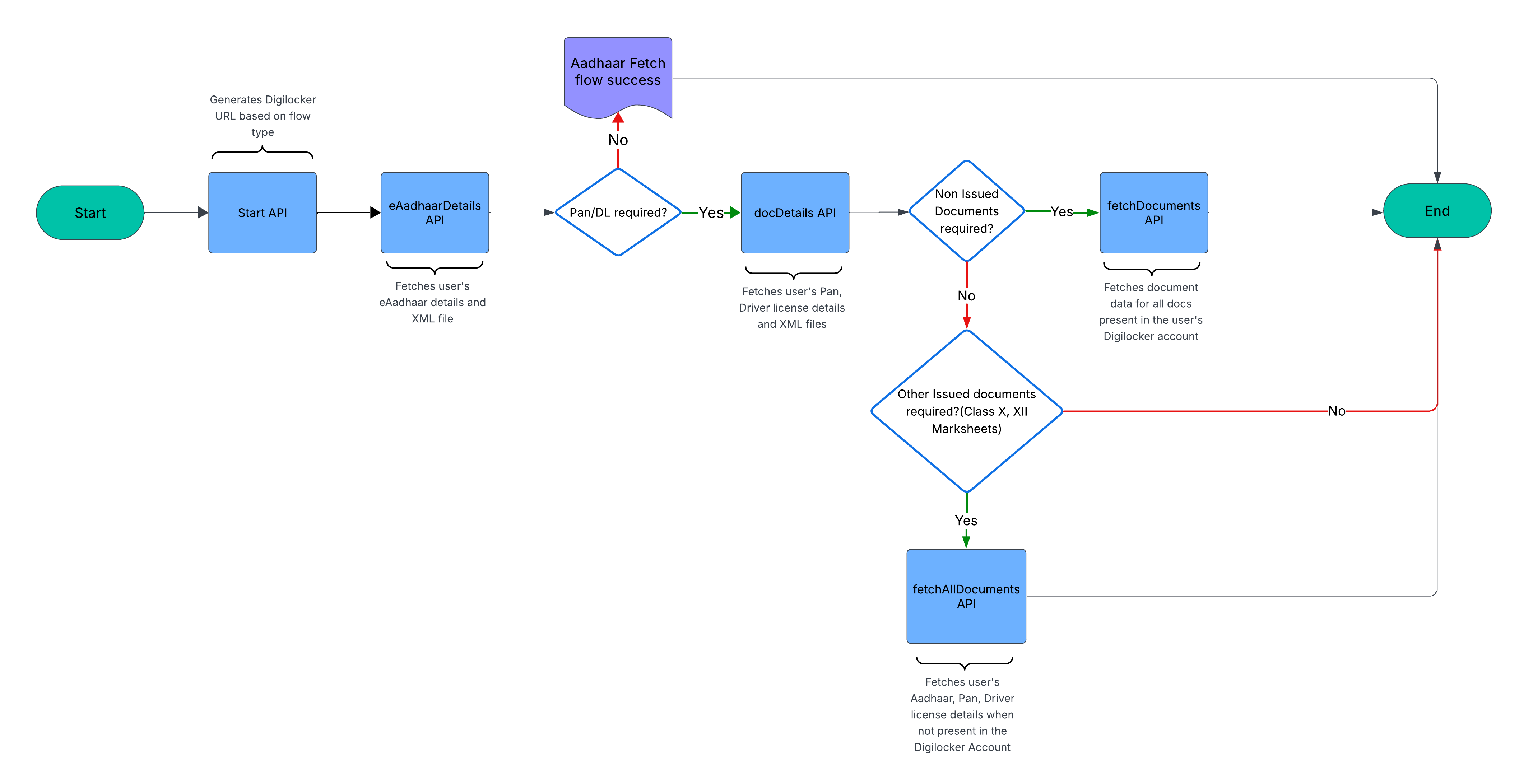
The following flowchart illustrates the complete DigiLocker document retrieval and verification flow:
Flow Explanation
The DigiLocker journey begins with the Start API, which returns an authentication URL for the user. Once authenticated, documents can be fetched in any order based on your specific requirements.
If additional documents are needed, the system determines whether to fetch non-issued documents (documents not yet in DigiLocker) or issued documents (already present in the user's DigiLocker). The entire flow is designed to handle different document types efficiently while maintaining proper consent and authentication throughout the process.
Overview
What is DigiLocker?
DigiLocker is one of the sources for marking documents as OSV (Originally Seen and Verified) e-documents or electronic equivalents of OVD (Officially Valid Documents).
Document Legitimacy Requirements
An electronic document is considered legitimate only if it has a digital signature, which DigiLocker provides (though not exclusively).
Regulatory Compliance
- Intermediary Requirements: Registered intermediaries are required to verify copies of OVD provided by investors with the original OVD
- Simplified Process: For investor convenience, OVD can be deemed as "seen and verified" with the original when:
- The investor provides the OVD through the eSign mechanism as a clear photograph/scanned copy of the original, OR
- The document is digitally signed and issued to DigiLocker by the issuing authority
SEBI Recognition
Since the SEBI notification, registered intermediaries (RI) have adopted DigiLocker as a means for verifying OVD. The act of checking if a document exists on DigiLocker serves as proof for OVD verification.
User Requirements
- Aadhaar-Mobile Linkage: Aadhaar must be linked to the mobile number as a prerequisite
- Minimum Sign-up: End users need a mobile number at minimum
- Document Access: To access documents from various issuers, users must link their Aadhaar to DigiLocker
Who Can Use DigiLocker?
- Eligibility: Both Registered Entities (REs) and Non-Registered Entities can apply for DigiLocker integration
- Approval Process: Access is subject to DigiLocker's discretion and approval
- Integration Requirements: You need DigiLocker license and credentials to integrate with their APIs
This official government document provides comprehensive information about DigiLocker definitions, rules, and amendments. It serves as the authoritative reference for understanding DigiLocker's regulatory framework and operational guidelines.
DigiLocker definition and rules - Government Aided Reference Documentation
DigiLocker APIs
The following APIs enable secure document retrieval and verification from DigiLocker:
| API Name | Description |
|---|---|
| DigiLocker Credentials API | Fetches prerequisite credentials required for DigiLocker integration |
| DigiLocker Consent URL API | Starts the consent process for DigiLocker document access |
| DigiLocker Fetch eAadhaar API | Fetches eAadhaar documents from DigiLocker |
| DigiLocker Fetch PAN and Driving Licence API | Fetches PAN and driving license documents from DigiLocker |
| DigiLocker Fetch All Docs API | Fetches all available documents from DigiLocker |
| DigiLocker Fetch Supported Documents and Issuers API | Fetches document type mappings from DigiLocker |
| DigiLocker Pull Parameters API | Pulls parameters for DigiLocker document fetch operations |
| DigiLocker Fetch Document API | Fetches documents from DigiLocker using user consent and credentials |
| DigiLocker Get Issued Document API | Fetches issued documents from DigiLocker for verification and use |
| DigiLocker Verify XML File API | Verifies XML documents fetched from DigiLocker for authenticity |
| DigiLocker FAQs | Answered all Frequently Asked Questions for DigiLocker APIs |